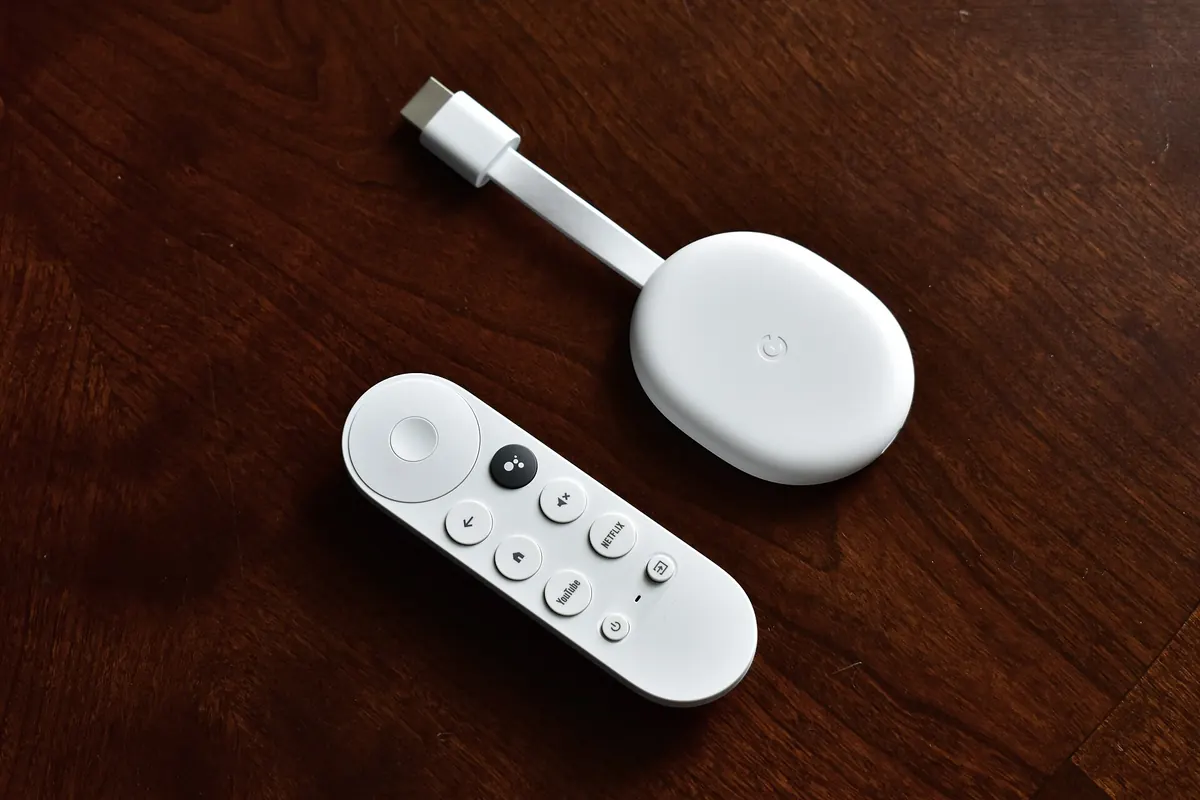
Firestick IPTV setups are among the most popular ways to watch internet TV, but Amazon's Fire TV Stick isn't the only good choice. Google's Chromecast with Google TV and other Google TV devices compete directly. This guide compares the two platforms for IPTV viewing so you can pick the one that suits your home.
For step-by-step Fire TV setup, see our IPTV Firestick guide. For TV boxes more broadly, see our TV box buying guide. Monster IPTV is not affiliated with Amazon or Google. Models and features change, so check current specifications.
At a glance
| Factor | Fire TV Stick | Chromecast with Google TV / Google TV devices |
|---|---|---|
| App store | Amazon Appstore | Google Play |
| Interface | Amazon-focused home screen | Google TV recommendations |
| Voice assistant | Alexa | Google Assistant |
| Remote | Alexa remote with TV controls | Google TV remote with TV controls |
| Casting | Limited | Built-in Chromecast |
| Ethernet | Via adapter | Via adapter |
| 4K and HDR | On 4K models | On 4K models |
App availability
Popular IPTV players are available on both platforms, but not always the same versions. Google Play generally has a wider selection of Android apps; the Amazon Appstore covers most popular players. Check that your preferred player is in the official store for the device before buying.
Performance
Newer 4K models of both platforms handle HD and 4K streams well, with HEVC support. Older or entry-level models can be slower with large channel lists. If you use big playlists with a detailed guide, choose a recent model with more memory.
Storage
Sticks have limited storage. IPTV players with large guides and caches can fill it. Keep only the apps you use, clear caches occasionally and avoid installing many large games.
Network
Both platforms work on Wi-Fi, but Ethernet adapters give the most stable picture for live sport. If your router is far away, consider powerline adapters or mesh Wi-Fi.
Remote and ease of use
Both remotes can control TV power and volume. Some households prefer Alexa for voice; others prefer Google Assistant. For older viewers, test which remote and interface feels simpler.
Casting
Chromecast with Google TV has built-in casting, handy for sending video from phones. Fire TV Sticks support some screen mirroring but casting is less seamless.
Which should you choose?
| If you... | Consider |
|---|---|
| Use Alexa at home | Fire TV Stick |
| Use Google services and cast often | Chromecast with Google TV |
| Want the widest Android app choice | A Google TV device |
| Want a familiar Amazon interface | Fire TV Stick |
| Watch lots of live sport | Either recent 4K model with Ethernet |
Setting up either device for IPTV
- Connect the stick to the TV's HDMI port and power it with the supplied adapter.
- Sign in and install system updates.
- Add an Ethernet adapter if possible.
- Install your IPTV player from the official store.
- Enter your login, load the guide and set favourites.
- Turn on match frame rate or equivalent settings where available.
Picture settings
Both platforms offer display settings for resolution, HDR and frame rate. For sport, matching the frame rate of the content can make motion smoother. If colours look washed out, check HDR settings on both the stick and the TV.
Multi-TV homes
Many households use one platform on the main TV and another in the bedroom. That's fine; your IPTV login usually works in players on both, within your plan's device limit. Using the same player app on both makes life easier for everyone.
Longevity and updates
Both Amazon and Google update their devices for several years, but older models eventually stop receiving updates. When choosing, a newer model usually means longer support.
Safety
Install apps only from the official store. Avoid "jailbroken" or "fully loaded" sticks and apps sideloaded from links, which often come with unlicensed content and malware. This is general information, not legal advice; see is IPTV legal?.
Common mistakes
- Buying before checking app availability.
- Choosing an entry-level model for large playlists.
- Relying on weak Wi-Fi for live sport.
- Filling storage with unused apps.
A worked example
A household already uses Google Assistant and often casts from phones. They compare their preferred IPTV player's availability on both stores, buy a Google TV device, add an Ethernet adapter and keep their old Fire TV Stick for the bedroom TV.
Checklist
- Check app availability on each store.
- Choose a recent 4K model.
- Plan for Ethernet.
- Match the voice assistant to your home.
- Install apps from official stores only.
Key terms
- Google TV: Google's TV interface on Chromecast and other devices.
- Amazon Appstore: the app store on Fire TV.
- Casting: sending video from a phone to the TV.
About Monster IPTV
Monster IPTV works with third-party players on Fire TV and Google TV devices. See supported devices and our best IPTV player guide.
Accessibility
Both platforms offer accessibility features such as screen readers, magnification, high-contrast text and captions settings. If anyone in the household relies on these, test them on the device before committing, as layouts and options differ between platforms.
Second-hand sticks
If you buy a used stick, factory reset it before use, sign in with your own account and install apps only from the official store. This removes any unofficial apps or accounts left by the previous owner and gives you a clean, secure start.
Final thought
Either platform works well for IPTV; choose the one that fits your home, apps and remote preferences best.
Frequently asked questions
Is Firestick IPTV better than Chromecast with Google TV?
Neither is always better; compare app availability, interface, remote and casting needs.
Do both support 4K and HDR?
Their 4K models do; check the specific model.
Can I use Ethernet with a stick?
Yes, with a compatible adapter.
Which has more apps?
Google Play generally has a wider selection, but popular IPTV players are on both.
Are jailbroken Firesticks safe?
No; they often include unlicensed content and malware.
Summary
For Firestick IPTV viewing, Fire TV Sticks and Chromecast with Google TV are both strong. Check app availability, choose a recent 4K model, plan for Ethernet and install apps only from official stores.